
I’m the founder of Pivona, so Pivona is in the table. I’ve tried to be honest, but it’s my product — keep that in mind.
Five tools for managing freelance clients — Google Sheets, Notion, HoneyBook, Bonsai and Pivona — compared on price, language, reminders, documents, and the honest downsides of each.
Pivona is a CRM for freelancers on the Ukrainian market, built for sole-trader (FOP) accounting and client records in hryvnia.
Comparison table
| Google Sheets | Notion | HoneyBook | Bonsai | Pivona | |
|---|---|---|---|---|---|
| Best for | 1–3 clients, $0 | if you like building things | English-speaking clients | English-speaking clients | Sole traders (FOP), Ukrainian market |
| Price | free | free / paid plans | paid (see pricing at honeybook.com) | paid (see pricing at hellobonsai.com) | ₴1,290/month |
| Ukrainian language | yes (you write it yourself) | no Ukrainian interface | no | no | yes |
| Client card | no (just a row in a spreadsheet) | none (you have to build it) | yes | yes | yes |
| Revenue per client | manually, with formulas | manually, with formulas | yes | yes | yes |
| Invoices and documents | manually | manually | yes (English, USD) | yes (US format) | yes |
| Follow-up reminders | no | you set date reminders yourself | yes | yes | yes |
| Sole-trader (FOP) documents | manually | manually | no (built for the Western market, no FOP accounting) | no (built for the Western market, no FOP accounting) | yes |
| Data export | yes (it’s your file) | yes | yes | yes | CSV by section; not as a single archive |
What’s honestly against each one
Google Sheets. Free and fully under your control. But it won’t remind you about follow-ups, won’t show revenue per client automatically, won’t send an invoice. Everything is manual. It works while you have few clients and can still hold it all in your head.
Notion. Flexible, but empty. It doesn’t know what a client, a payment or a deadline is until you build it. Three signs it’s time to move on from Notion — in the previous article.
HoneyBook. Built for the Western market: contracts, invoices, proposals — in English and in dollars. Not suited to FOP accounting. Price rises with the number of projects.
Bonsai. Similar story — US-format documents, payment logic in dollars. If your clients are English-speaking, it works. If they’re Ukrainian, you’ll end up duplicating documents.
Pivona. Three things against it:
No one-click migration. You can export clients, leads, tasks, services and expenses to CSV — each section separately. But pulling the whole account into a single archive and handing it to another system — no. If you decide to leave, you’ll have to piece the files together by hand.
The product has been in beta since 2026. There are no user reviews yet, and I’m not going to make any up.
Price — ₴1,290/month. More expensive than Google Sheets (free) and comparable to the Western alternatives, which have a wider set of integrations.
Pivona isn’t for you if
- You need one-move migration — CSV by section exists, but you can’t pull the whole account into a single archive and upload it to another system.
- You work offline — Pivona only runs in the browser, there’s no offline mode.
- You need accounting-software integration — there’s no direct link to BAS, M.E.Doc or other accounting software.
- Your clients are English-speaking — HoneyBook or Bonsai will do it better: contracts, invoices, proposals, in English from day one.
What the table won’t show you
The table compares features. But people abandon a tool not because of its features, but because it didn’t fit into their day.
The client sees a fast reply, a structured report, a tidy invoice — and has no idea what made that happen.
They don’t care whether it’s a CRM or a spreadsheet. You do, though, because you know how much time it takes.
Three questions to choose in two minutes
1. How many active clients do you have?
One to three, and you haven’t lost any → Google Sheets is enough. Don’t pay extra for what your head can still hold.
Five or more, or you have leads you’re running in parallel → you need a system with reminders and a client card.
2. How many of your clients need FOP documents?
All or most → Google Sheets (free, but everything manual) or Pivona (paid, but invoices and documents built from data you already have).
None, your clients are English-speaking → HoneyBook or Bonsai. Both are built for the Western market: contracts, invoices, proposals — in English and in dollars.
A mix → HoneyBook/Bonsai for English-speaking clients, Sheets or Pivona for Ukrainian ones. There’s no one-size-fits-all answer.
3. How much time are you willing to spend setting it up?
None → a ready-made system (HoneyBook, Bonsai, Pivona). Open it and you’re working.
You have an evening and enjoy building → Notion. But honestly: if you already recognise the three signs from the previous article, you’ll build it and abandon it again.
What’s behind the “Pivona” column
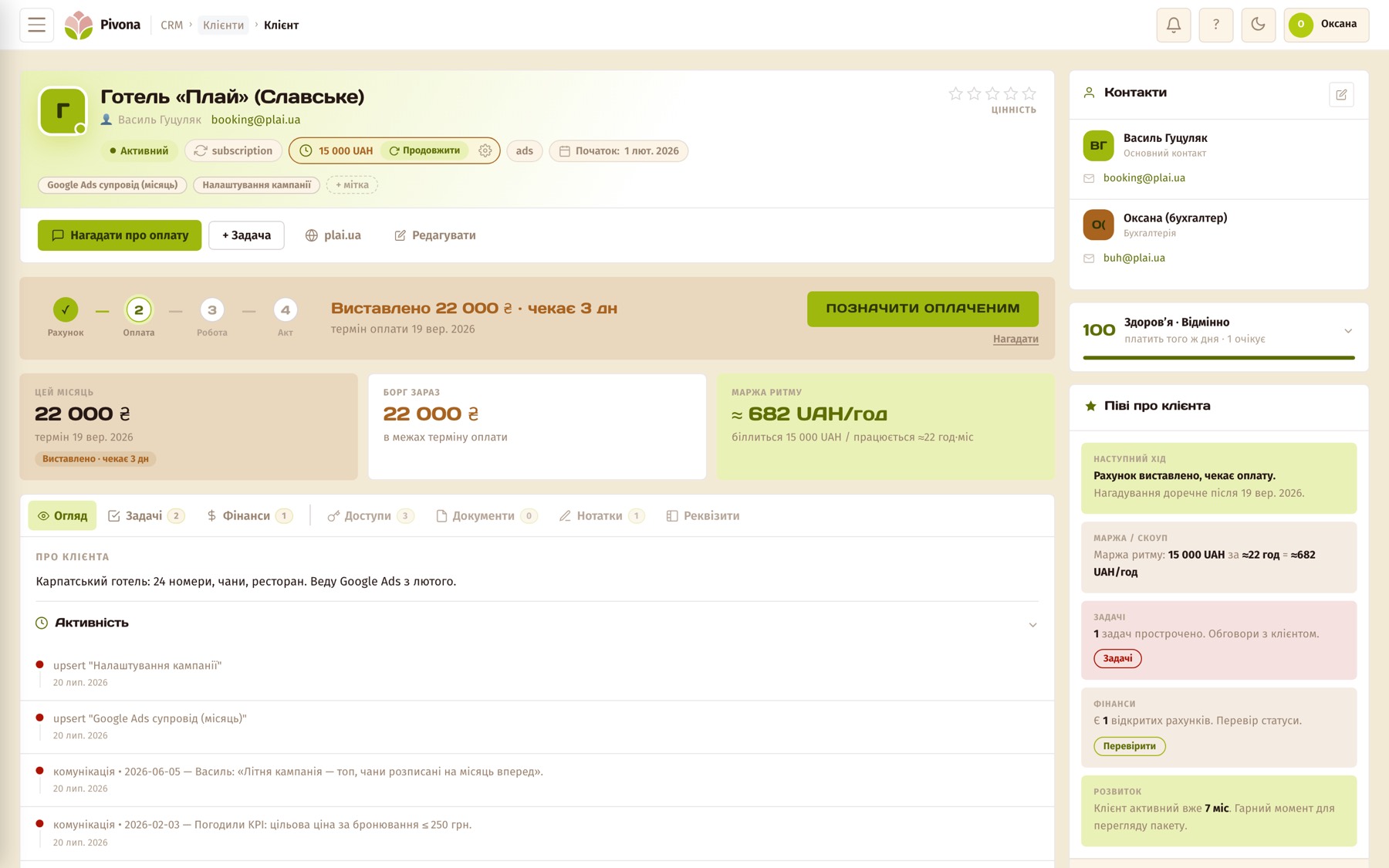
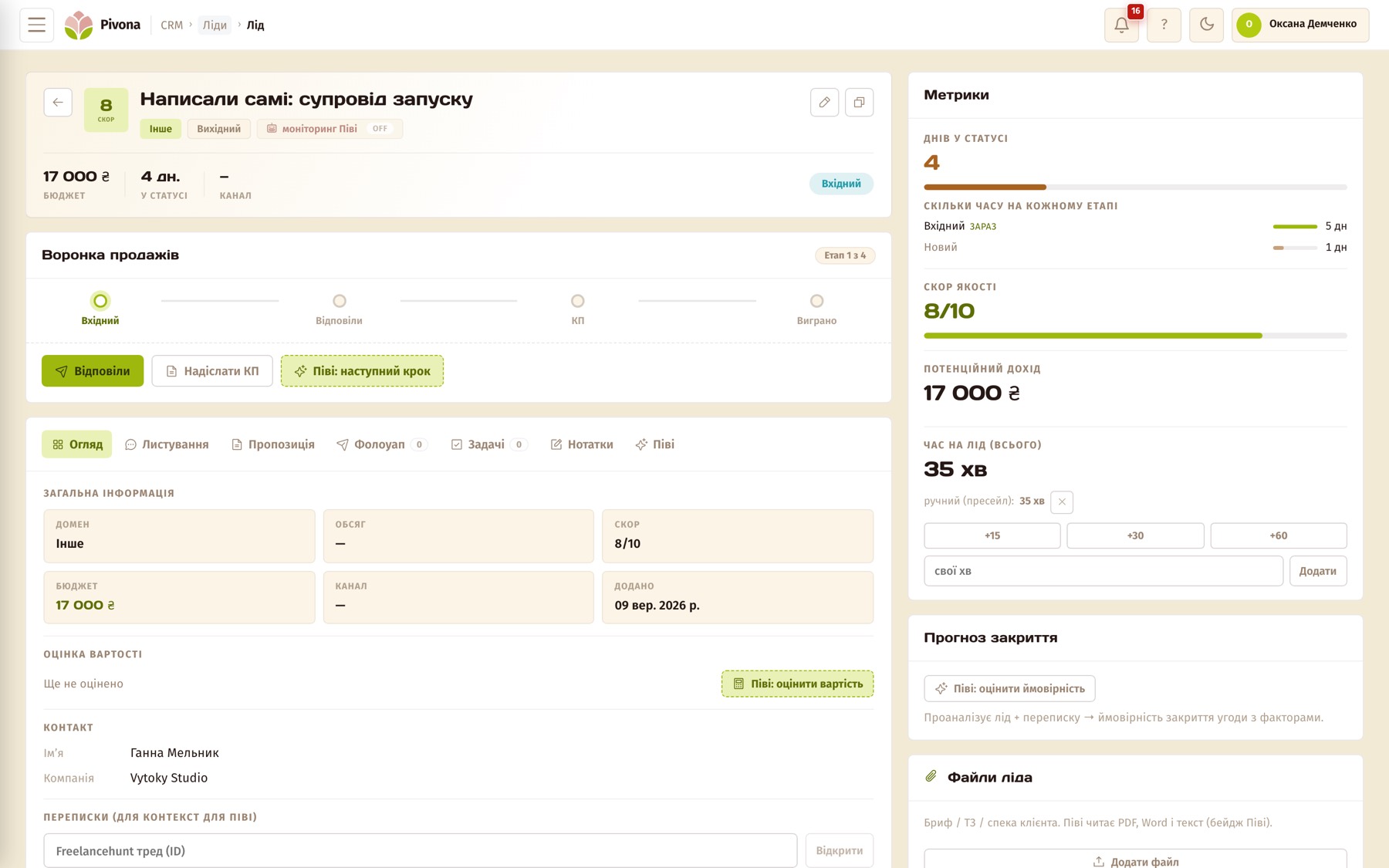
Pivona in this table is mine, and you don’t need to take my word for it. Two screens from the demo account, so the “yes” in the cells can be checked with your own eyes. The numbers on them are for demonstration only.
The “Client card”, “Revenue per client” and “Invoices and documents” rows. An invoice is raised from the card, payment is marked on it, and the total per client adds itself up — no formula you have to remember to update.
The “Follow-up reminders” row. Every lead has a funnel stage and a counter of days spent in that status. Once a day the system checks the funnel, flags the moment for the next message, and drafts it. You send it yourself.
There won’t be screenshots of the other four tools here: I don’t run my day-to-day work in them, and showing someone else’s product using someone else’s material stops being a comparison and becomes a retelling. Each of them has its own website where you can see the same thing.